
There is something deeply satisfying about forming words from a jumble of letters. The click of tiles, the thrill of a high-scoring play, the moment of triumph when you spot a seven-letter word that was hiding in plain sight. For word game enthusiasts, Scrabble has long been the gold standard. But sometimes, you want a similar experience without the pressure of a live opponent or the hassle of setting up a physical board.
Arkadium’s Outspell offers exactly that. This free online word game takes the beloved mechanics of Scrabble and adds fun twists of its own. With difficulty levels ranging from easy to expert, Outspell challenges you to test your vocabulary skills, plan your moves strategically, and beat your own high scores.
In this article, we will explore everything Outspell has to offer: how to play, what makes it unique, strategies for success, and why word game fans keep coming back.
What Is Arkadium’s Outspell? A Word Lover’s Playground
Outspell is a browser-based word game published by Arkadium, a well-known developer of casual online games. Built with HTML5 and JavaScript, it runs in any modern web browser and is fully compatible with mobile devices (iOS and Android) as well as desktop computers.
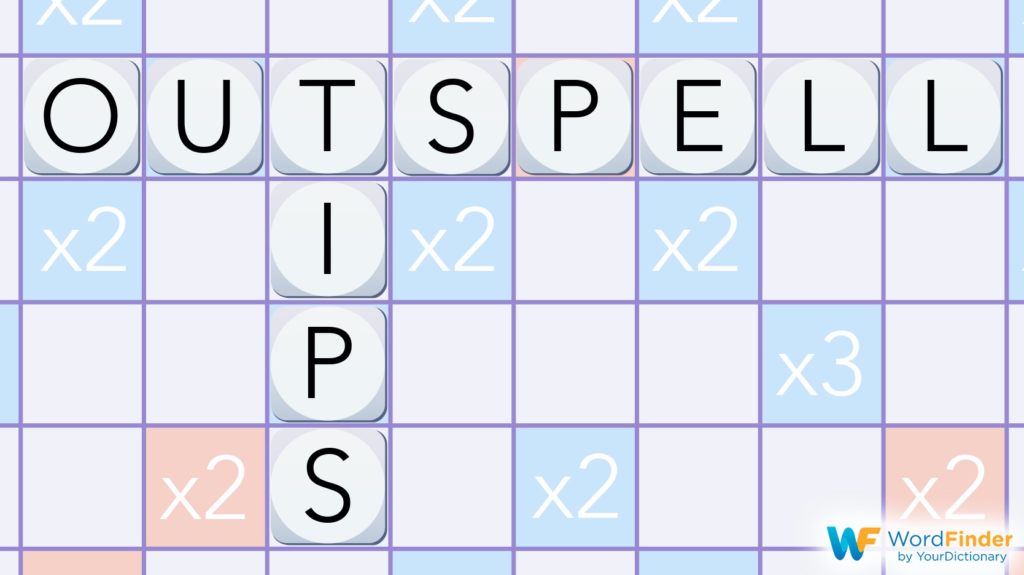
The core concept will feel immediately familiar to Scrabble players. You have a rack of letter tiles. You place them on a game board to form words, earning points based on letter values and premium squares (double letter, triple word, etc.). However, Outspell introduces its own unique elements that set it apart from traditional Scrabble.
Key Features at a Glance
- Scrabble-Style Gameplay: Form words from random letters on a grid board.
- Multiple Difficulty Levels: Choose from easy to expert to match your skill.
- Solo Play: Challenge yourself, not a live opponent.
- Track Your Progress: Aim to beat your previous high scores.
- Free to Play: No cost, no downloads, no account required.
- Cross-Platform: Works on desktop and mobile (iOS/Android).
- Fun Twists: Unique rule variations that keep the game fresh.
How to Play: Classic Scrabble with a Solo Focus
Outspell shares the basic mechanics of Scrabble but is designed for single-player play. Instead of competing against another person, you are playing against the game’s AI (artificial intelligence) or simply trying to achieve the highest score possible on a given board.
Basic Setup
The game presents you with:
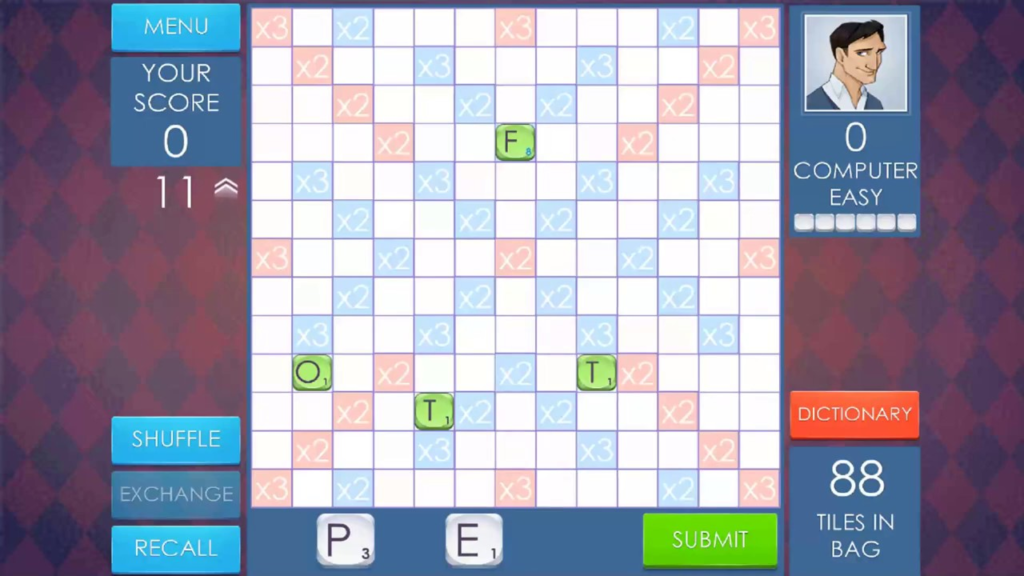
- A game board: A 15×15 grid of squares, some with premium score multipliers (double letter, triple letter, double word, triple word).
- A tile rack: Usually seven letter tiles, each with a point value.
- A score display: Tracks your current score.
Core Gameplay Loop
- Examine Your Tiles: Look at the letters on your rack. Identify possible words.
- Scan the Board: Look for existing words you can build upon. Adding one letter to an existing word can score big points.
- Place Your Word: Drag or click to place your letters on the board. Words must read left to right (horizontally) or top to bottom (vertically).
- Submit Your Play: Confirm your word. The game checks if it is a valid English word.
- Earn Points: Your score is calculated based on letter values and any premium squares your letters cover.
- Draw New Tiles: After your turn, you draw new letters to replenish your rack to seven.
- The AI Plays: In some versions, the computer opponent takes its turn, placing its own word.
- Repeat: Continue until no more plays are possible or the tile bag is empty.
The “Fun Twists”
The source material mentions “fun twists on the classic rules.” While the exact twists are not specified, typical Outspell variations may include:
- No Turn Timer: Unlike competitive Scrabble, you can take as long as you want to think.
- Hint System: If you are stuck, the game may offer a hint or shuffle your tiles.
- Word Checker: The game will tell you if a word is invalid before you commit.
- Difficulty-Based AI: On easy mode, the computer plays poorly. On expert mode, it plays optimally.
- Alternative Scoring: Some versions may award bonus points for using all seven tiles in one turn.
Difficulty Levels: From Novice to Wordsmith
One of Outspell’s greatest strengths is its adjustable difficulty.
Easy Mode
- AI Opponent: Makes obvious mistakes, plays short, low-scoring words.
- Best for: Beginners, casual players, or anyone who wants a relaxing word game experience.
- Learning Value: Allows you to experiment with word placement without pressure.
Medium Mode
- AI Opponent: Plays competently but not perfectly. Uses decent strategy.
- Best for: Intermediate players who know the rules and want a fair challenge.
- Learning Value: Encourages you to think about board positioning and premium squares.
Hard/Expert Mode
- AI Opponent: Plays optimally. Uses advanced strategies, blocks your high-scoring spots, maximizes its own points.
- Best for: Experienced Scrabble players looking for a tough solo challenge.
- Learning Value: Forces you to improve your vocabulary and strategic thinking.
Playing Solo (vs. No Opponent)
Some versions of Outspell allow you to play without an AI opponent. You simply try to achieve the highest score possible on each board. This is perfect for players who find competition stressful or who want to focus purely on vocabulary building.
Strategies for High Scores
Ready to dominate the leaderboard? Implement these word game strategies.
1. Learn Two-Letter Words
In Scrabble-style games, two-letter words are essential. They allow you to:
- Use up awkward letters (like Q, Z, X, J).
- Build parallel words.
- Score points in tight spaces.
Memorize common two-letter words: “aa,” “ab,” “ad,” “ae,” “ag,” “ah,” “ai,” “al,” “am,” “an,” “ar,” “as,” “at,” “aw,” “ax,” “ay,” “ba,” “be,” “bi,” “bo,” “by,” “da,” “de,” “do,” “ed,” “ef,” “eh,” “el,” “em,” “en,” “er,” “es,” “et,” “ex,” “fa,” “fe,” “gi,” “go,” “ha,” “he,” “hi,” “hm,” “ho,” “id,” “if,” “in,” “is,” “it,” “jo,” “ka,” “ki,” “la,” “li,” “lo,” “ma,” “me,” “mi,” “mm,” “mo,” “mu,” “my,” “na,” “ne,” “no,” “nu,” “od,” “oe,” “of,” “oh,” “oi,” “om,” “on,” “op,” “or,” “os,” “ow,” “ox,” “oy,” “pa,” “pe,” “pi,” “po,” “qi,” “re,” “sh,” “si,” “so,” “ta,” “te,” “ti,” “to,” “uh,” “um,” “un,” “up,” “us,” “ut,” “we,” “wo,” “xi,” “xu,” “ya,” “ye,” “yo,” “za”.
2. Use Premium Squares Strategically
Do not just place a word because it fits. Look for opportunities to cover:
- Double Letter: Place a high-value letter (Q, Z, X, J, K) on a double letter square.
- Triple Letter: Even better. A Q on a triple letter square is worth 30 points before adding the rest of the word.
- Double Word: Ideally, cover a double word square with a long word (5+ letters). The multiplier applies to the entire word.
- Triple Word: The holy grail. A seven-letter word covering a triple word square can score hundreds of points.
3. Look for “Hooks”
A “hook” is a single letter that turns an existing word into a new word. For example, if the board has “CAT,” adding an “S” to make “CATS” is a hook. Hooks are low-effort, high-reward plays.
4. Save Your S for Plurals
The letter S is the most versatile tile in the game. It can pluralize almost any noun. Do not waste your S on a short word early in the game unless it scores very well. Save it for a longer word later.
5. Use the Shuffle Feature
If you have been staring at your tiles for a minute and see nothing, use the shuffle button (if available). Rearranging your tiles often reveals patterns you missed.
6. Play Defensively Against the AI
If you are playing against the computer on higher difficulties, pay attention to where it wants to play. If you see a premium square that the AI is likely to use, try to block it by placing a word there first, even if it is not your highest-scoring option.
Solo Play and Progress Tracking
Outspell is designed for solo enjoyment, but it includes features to keep you motivated.
Tracking Your Progress
The game likely tracks:
- Your highest score on each difficulty level.
- Your longest word ever played.
- Your total points across all games.
- Number of games played and won.
Aiming to Beat High Scores
Because you are playing against yourself (or a consistent AI), your primary goal is self-improvement. Try to beat your previous high score on each board. This shifts the focus from competition to personal growth, which many players find more satisfying.
Technical Requirements and Compatibility
Outspell is built using HTML5 and JavaScript and runs in any modern web browser.
| Requirement | Details |
|---|---|
| Platform | Desktop, laptop, smartphone, tablet |
| Operating System | Windows, macOS, Linux, iOS, Android |
| Browser | Chrome, Firefox, Safari, Edge (latest versions) |
| Technology | HTML5 / JavaScript |
| Controls | Mouse or touch (drag and drop or tap) |
| Screen Orientation | Portrait (640×480) |
| Internet | Required for initial load; offline play possible after loading |
The game’s portrait orientation makes it comfortable to play on a smartphone held vertically. The 640×480 resolution is modest, meaning the game will run smoothly even on older devices or slow internet connections.
Privacy and Cookie Notice
Like most free online games, Outspell is hosted on websites that may use cookies for advertising, analytics, and functionality. These include:
- Strictly Necessary Cookies: Required for the game to load and run properly.
- Performance Cookies: Help the website understand how players interact with the game.
- Targeting Cookies: Used to show relevant advertisements based on your interests.
You can typically manage these preferences through the website’s cookie consent tool. Playing in a private browsing window or using a browser with built-in tracker blocking can limit data collection.
Frequently Asked Questions (FAQs)
1. Is Outspell the same as Scrabble?
Outspell is very similar to Scrabble in terms of core mechanics (forming words from letter tiles on a grid with premium squares). However, Outspell is designed for solo play against an AI, includes difficulty levels, and may have unique rule variations that differ from official Scrabble rules.
2. Is Outspell really free?
Yes. Outspell is completely free to play. There are no download fees, subscription costs, or mandatory in-game purchases. Some hosting sites may include optional advertisements, but these do not block core gameplay.
3. Can I play Outspell on my phone?
Yes. The game is marked as mobile web compatible for both iOS and Android. It is designed for portrait orientation, so you can hold your phone normally and play with touch controls.
4. What are the difficulty levels in Outspell?
Outspell offers multiple difficulty levels, typically ranging from easy to expert. On easier difficulties, the AI opponent makes mistakes and plays poorly. On expert, the AI plays optimally, providing a serious challenge for experienced word game players.
5. Does Outspell have a hint system?
Yes. Outspell typically includes features to help players who are stuck, such as a shuffle button to rearrange your tiles or a hint button that suggests a possible word. These features are especially helpful for beginners or casual players.
Conclusion: A Word Game Worth Your Time
Arkadium’s Outspell does not try to reinvent the word game genre. It takes what works about Scrabble—the letter tiles, the premium squares, the thrill of a well-placed word—and adapts it for solo digital play. The result is a game that is accessible to beginners, challenging for experts, and satisfying for everyone in between.
The adjustable difficulty levels mean you can grow with the game. Start on easy to learn the mechanics. Move to medium once you are comfortable. Tackle expert when you want to test your vocabulary against a worthy opponent. And if competition stresses you out, play solo and focus on beating your own high scores.